Check that it shows
Find out whether a published injectable really appears on your shoppers' pages, how fast, and what to do when it fails.
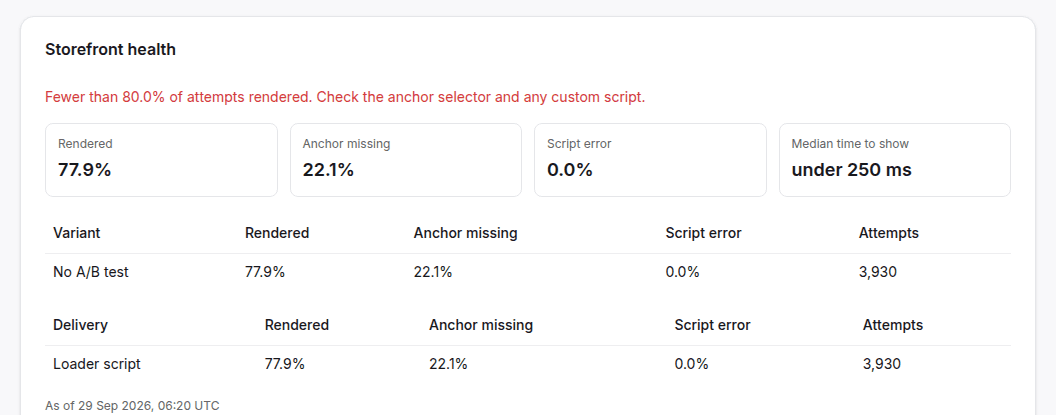
A published injectable can still fail to appear. A theme update can remove the element it goes beside. A script can stop with an error. The Storefront health panel tells you whether the injectable appears on real pages.
Open an injectable, press Analytics, and scroll to Storefront health.
Before you start
- StoreSpan measures injectables with Loader script delivery only. For the other deliveries, and for kits, the panel stays empty.
- StoreSpan updates the panel overnight. The line As of gives the time of the last update.
- StoreSpan measures a share of page views, not all of them. An injectable with few views needs some days to have figures.
Read the panel
| Figure | What it means | When it is a problem |
|---|---|---|
| Rendered | The share of attempts in which the injectable appeared. | Under 80% |
| Anchor missing | The share in which the page had no element to put it beside. | More than a few percent |
| Script error | The share in which the content stopped with an error. | Any |
| Median time to show | How long the injectable took to appear, for a typical page view. | 1 to 3 s or over 3 s |
An attempt is a page view on which StoreSpan tried to show the injectable. A page view on which the rules, the schedule or the frequency cap kept the injectable away is not an attempt, and not a failure.
Under the figures, two tables split them by Variant and by Delivery. With an A/B test, the first table shows a variant that fails, which is different from a variant that sells less.
Fix an injectable that fails
| You see | Likely cause | What to do |
|---|---|---|
| Anchor missing is high | Your theme changed, and the element is gone or has a new name. | Correct Anchor selector. See Loader script. |
| Anchor missing on some pages | The element is on some kinds of page only. | Add a Page type condition, so the injectable runs only there. |
| Script error is above zero | A script in the content, or a Custom script condition, has a mistake. | Ask the person who wrote the script. |
| Median time to show is slow | The StoreSpan script loads late on your page. | Move the script higher in the head. See Install the StoreSpan script. |
When fewer than 80% of attempts appeared, the panel says Fewer than 80% of attempts rendered. Check the anchor selector and any custom script.
Warnings
You do not need to watch the panel.
- In the list of injectables, a red Render failing badge marks an injectable that failed in more than 20% of at least 50 attempts.
- When an injectable starts to fail soon after you published it, StoreSpan's team gets an alert.
When the panel is empty
The panel says No health data yet. The storefront health signal is sampled and gathered overnight; check back after it has run for this range.
| Cause | What to do |
|---|---|
| You published the injectable today | Look again tomorrow. |
| The injectable has few views | Choose a longer period. |
| The delivery is not Loader script | Nothing. StoreSpan does not measure it yet. |
What StoreSpan collects for this
For each attempt it measures, StoreSpan records which injectable it was, how it was delivered, what happened and roughly how long it took. It records no personal details. It carries the same random number for the browser that StoreSpan uses for its counts. See Privacy and accuracy.