Privacy and accuracy
What StoreSpan collects about your shoppers, how to wait for their consent, and why its numbers can differ from other tools.
StoreSpan counts views and clicks so that you can see what works. This page says what it collects to do that, and how you control it.
You are responsible for what your own privacy policy says. Use this page as a source for it, and ask a lawyer when in doubt.
What StoreSpan collects
| StoreSpan sends | Why |
|---|---|
| A random number for the shopper's browser | To count a shopper who returns as one shopper. |
| A random number for the browser tab | To tell one visit from another. |
| Which injectable the shopper saw or clicked | To count views and clicks. |
| New, returning or logged in | To break the figures down. |
| The number of the cart, on a click | To link a later order to the injectable. |
StoreSpan's servers also see the address of the shopper's computer (the IP address) and the name of their browser, as every web server does. StoreSpan uses them to tell the shopper's region and to leave out robots. It does not keep the address itself.
What StoreSpan does not collect
The StoreSpan script does not send a shopper's name, email address, phone number, postal address or login.
The number of the cart is a code that BigCommerce gives the cart. It says nothing about the person.
What stays in the shopper's browser
| Kept in the browser | For how long |
|---|---|
| The random number for the browser | 13 months. Then the browser gets a new one at the next visit. |
| The time of the first visit | As long as the number above. |
| The counts for the frequency cap | Until the shopper clears their browser data. |
| The shopper's country and how they first arrived, for your rules | Until the shopper closes the tab. |
| A note that your rules use the shopper's country or the time | Until the shopper clears their browser data. |
The note in the last row is about your store, not about the shopper. It is the same for every shopper, and it lets the next visit ask for the country or the time sooner. StoreSpan keeps it whether or not the shopper agreed to tracking, and also for a shopper whose browser sends one of the signals described below.
A shopper counts as new for the first 30 minutes after their first visit, and as returning after that.
StoreSpan asks your store whether the shopper is signed in only when an injectable needs to know. That is the case when its rules use Visitor type or Custom script. The answer is yes or no. StoreSpan does not read the account.
Shoppers who do not want to be tracked
Browsers can tell a site that the shopper does not want to be tracked.
| Signal | What StoreSpan does |
|---|---|
| Global Privacy Control | Always respects it. You cannot switch this off. |
| Do Not Track | Respects it while Honour "do not track" is on in your settings. |
For a shopper who sends such a signal, StoreSpan writes no number to the browser and sends no view and no click. Your injectables still show.
StoreSpan also leaves out known robots.
Wait for consent
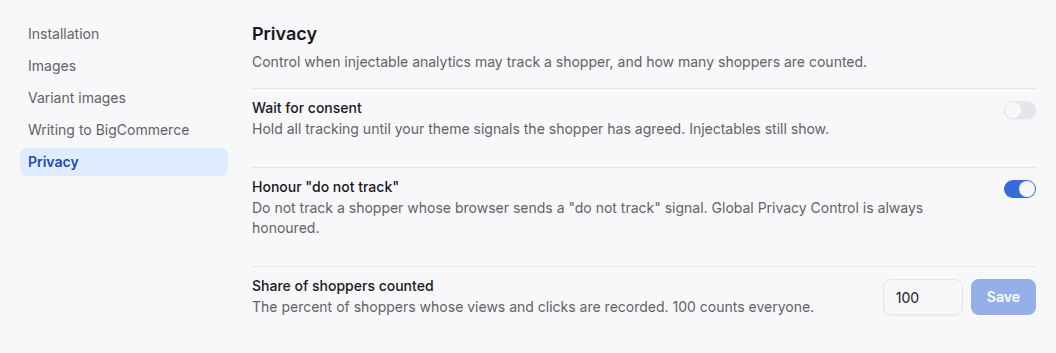
When your store asks shoppers for consent, you can hold StoreSpan's tracking back until they agree.
- Open Store › Settings › Privacy.
- Turn on Wait for consent.
- Press Save.
- Ask your developer to tell StoreSpan when a shopper agrees. See below.
Only the owner of the store can change these settings.
While Wait for consent is on, StoreSpan counts nothing until your theme tells it that the shopper agreed. Your injectables still show.
Consent holds back the counting, not the showing. To show your injectables, the StoreSpan script still loads their settings from StoreSpan. When a rule depends on the country, it also asks StoreSpan for the shopper's country, which StoreSpan tells from the address of their computer. The script keeps the answer in the browser until the shopper closes the tab.
Tell StoreSpan that a shopper agreed
Your theme sets a value on the page at the moment the shopper accepts:
window.storespanConsent = true;For a shopper who agreed on an earlier visit, set it before the StoreSpan script loads. Set it only when your theme has a record that this shopper agreed:
<script>
  if (window.myConsentBanner && window.myConsentBanner.hasAgreed()) {
    window.storespanConsent = true;
  }
</script>
Here myConsentBanner.hasAgreed() stands for the record of your own consent banner. A theme that sets the value for every shopper tracks shoppers who refused.
StoreSpan tracks from that moment on. It collects nothing from before.
StoreSpan cannot check your theme
StoreSpan trusts the value that your theme sets. When your theme sets it too early, or for a shopper who refused, StoreSpan tracks that shopper. Test your consent banner after you turn this on.
Count a share of your shoppers
A store with very many shoppers can count a share of them. Under Store › Settings › Privacy, enter the share in Share of shoppers counted. It starts at 100, which counts everyone.
A shopper is either always counted or never counted. So the click rate stays right, and the totals are smaller.
Storefront search
When you turn on storefront search, the words a shopper types are sent to Algolia, a search provider, which answers the search on StoreSpan's behalf. Unless popular searches are also switched on, StoreSpan sends only the search words and your product catalogue, and nothing about the shopper.
If popular searches are switched on for your store, each search also carries a short code made from the shopper's internet address. The address itself is never sent, and the code cannot be turned back into it. The code is different for each store, so it cannot be used to follow a shopper from one store to another. It only lets the provider tell one shopper's typing apart from another's, so it can work out which phrases are searched the most. Those popular phrases are then offered to shoppers as they type.
Why the numbers can differ from other tools
Two analytics tools rarely show the same number. These are the usual reasons:
| StoreSpan | Compared with a tool that does not |
|---|---|
| Counts a view when half of the injectable has been on the screen | Shows fewer views than a tool that counts every page load. |
| Leaves out robots and shoppers who do not want to be tracked | Shows fewer views. |
| Counts two clicks within one second as one | Shows fewer clicks. |
| Dates a view by the time its servers received it, in your store's time zone | Can put a view on another day. |
During a fault or a rush of visits, some views may not arrive. StoreSpan counts how many it lost.