Kit results
Read how many shoppers saw a kit, added it to the cart and ordered with its discount, and how fresh each number is.
Each kit has a section called How this kit is doing. It answers three questions: do shoppers see the kit, do they add it to the cart, and do they order with its discount?
Open Storefront › Kits, open a kit, and scroll to How this kit is doing. Pick the dates at the top of the section. It starts with the last 30 days, up to yesterday.
Do shoppers see the kit and add it?
| Number | What it counts |
|---|---|
| Views | Shoppers who saw the kit. |
| Add-button clicks | Shoppers who pressed the kit's button. |
| Adds to cart | Shoppers whose products reached the cart. |
| Views that led to an add | The share of shoppers who saw the kit and added it. |
Each shopper is counted once, however many times they saw the kit.
Views by device splits the views between computers, phones and tablets.
Do shoppers order with the discount?
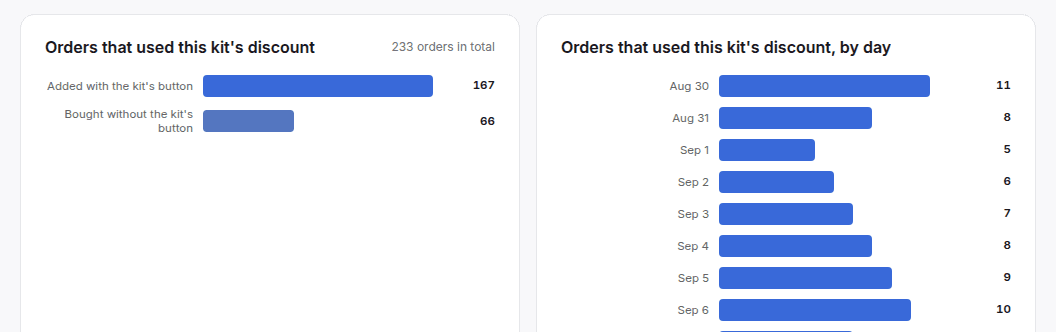
Orders that used this kit's discount counts the orders BigCommerce gave the kit's discount to. It is split in two:
| Number | What it counts |
|---|---|
| Added with the kit's button | The shopper used the kit on the product page. |
| Bought without the kit's button | The shopper put the products in the cart another way and still got the discount. |
A high second number means the discount often goes to shoppers who did not use the kit. That is expected: a kit's discount is for your whole store.
Orders that used this kit's discount, by day shows the same orders as a chart.
A coupon kit shows different numbers
A coupon kit gives the discount only to shoppers who used the kit, so the split above does not apply. Bought without the kit's button does not appear. In its place you see four figures:
| Number | What it counts |
|---|---|
| Codes handed out | Codes StoreSpan put on a cart. Counted on the day a code first reached a cart. |
| Codes applied in a cart | Codes that became a working discount on a cart. |
| Orders that used a code | Orders paid for with one of the codes. Counted on the day StoreSpan read the order. |
| Codes taken off in the cart | One-time codes that left a cart which still held the kit's products. Counted once per code. |
When a shopper got less than the kit showed
A line under the orders tells you when the discount in the cart was smaller than the saving the kit showed. It reads like this: Adds to cart from this kit: 3 got a smaller discount than shown.
The usual reason is that a product's price changed after you published the kit. To fix it, pause the kit and publish it again. See Change a kit that is live.
The line may also say that some adds got no discount at all. Most often the shopper did not finish the order.
For a coupon kit the line reads differently. It tells you when an add could not get the discount, like this: Adds to cart from this kit: 2 could not get the discount (most often: no code was left to hand out). It may also say how many codes handed out in this period have not been seen on an order yet, which is usually just orders the shopper has not finished. See A shopper saw no saving.
A coupon kit's line may also say how many kit discounts were taken off in the cart, like this: 4 kit discounts were taken off carts that still held the kit's products in this range. StoreSpan counts each code once, and only when it left a cart that still held the kit's products — it cannot tell for certain who removed it. A high number can mean the discount is not landing the way shoppers expect. See When a shopper removes the kit discount.
How fresh the numbers are
| Numbers | Updated |
|---|---|
| Views, clicks and adds to cart | Within about five minutes. |
| Orders and discounts | Once a day, overnight. Today's orders appear tomorrow. |
If there are no numbers
| What you see | Why |
|---|---|
| No orders used this kit's discount in this range. | No order got the discount on those dates. Check the dates, and that the kit is Active. |
| No views | Shoppers are not seeing the kit. See When a kit does not show. |
Who sees a kit, and where
Show a kit only to some shoppers, move it to another spot on the product page, and change its colours, corners and spacing.
When a kit does not show
Work through the checklist on the kit's page when a kit is missing from your storefront, and fix what stops a kit from being published.