When a kit does not show
Work through the checklist on the kit's page when a kit is missing from your storefront, and fix what stops a kit from being published.
If a kit is not on your product page, or will not publish, the kit's own page tells you why. Open Storefront › Kits and open the kit.
The kit is not on the storefront
The card Why isn't my kit showing? lists the checks StoreSpan can run for you, in order. Each is marked OK, Needs fixing or Cannot check from here. Press the card to open the list.
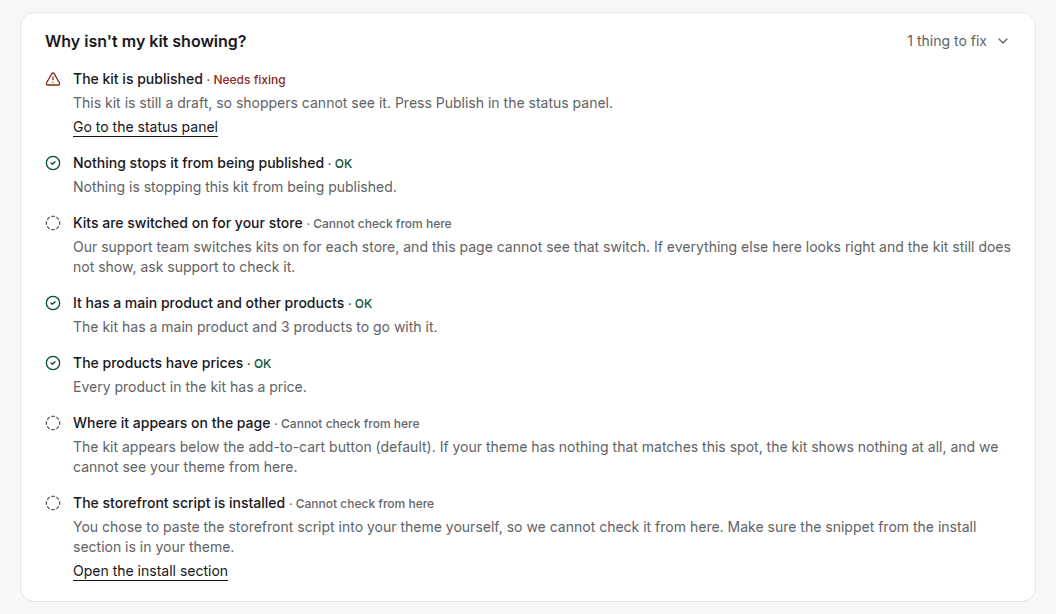
| Check | If it needs a fix |
|---|---|
| The kit is published | Press Publish in the Status panel. A draft, paused or archived kit does not show. |
| Nothing stops it from being published | Shown for a kit that is not live. Fix the reasons listed. See The kit will not publish. |
| Kits are switched on for your store | The page cannot check this. Ask StoreSpan support whether kits are switched on for your store. |
| It has a main product and other products | Add at least one product besides the main product. |
| The products have prices | Wait for the next product update from BigCommerce, or take the product without a price out of the kit. |
| Where it appears on the page | If you chose another spot, check that your theme has it. See Move a kit on the page. |
| The storefront script is installed | Install it. See Install the StoreSpan script. |
If every check is fine and the kit still does not show, look at these:
- A rule hides it from you. A rule under Where it shows may leave you out, for example by country or device.
- A product is out of stock. With Hide the whole kit chosen, the kit is hidden while a product the discount needs is out of stock. See When a product is out of stock.
- You are on another product's page. A kit shows only on the page of its main product.
The kit will not publish
When you press Publish and the kit cannot go live, the page says This kit cannot go live yet. Resolve the reasons shown, then publish again. The reasons are listed under This kit cannot go live yet.
| Reason | What to do |
|---|---|
| Marketing permission needed | Reconnect your BigCommerce store, so StoreSpan may create promotions. Use the link in the message. |
| Checkouts permission needed | A coupon kit also needs the Checkouts permission. Reconnect your BigCommerce store, using the link in the message. |
| No discount set | Enter a discount in the Offer section, or choose a kit with no discount. |
| Price still loading for a product | Wait a few minutes and publish again, or remove that product from the kit. |
| The discount and the products do not match | Check the Offer section. A kit that needs all products cannot let shoppers leave products out. |
| Promotion limit reached | Archive a kit you no longer use, or ask StoreSpan support to raise your store's limit. |
The kit shows, but without a saving
| Why | What to do |
|---|---|
| You published less than five minutes ago | Wait. The discount takes about five minutes to reach BigCommerce. |
| Kit discounts is stopped | Start it under Store › Settings › Writing to BigCommerce. See Stop all kit discounts. |
| The kit has no discount | Nothing. A kit with no discount never shows a saving. |
| Kit discounts are not switched on for your store | Ask StoreSpan support. |
The kit shows a percentage, but no amount in money
StoreSpan has not been able to read your prices from BigCommerce for three hours, so it holds back amounts that may be out of date. The amounts return by themselves after the next product update. See Prices and savings.
A coupon kit problem
These apply only to a kit whose discount is a coupon.
Codes ready shows 0
The kit page shows how many one-time codes are ready. When it shows 0, no shopper can get the discount until new codes are made.
- StoreSpan usually makes new codes within a few minutes while Kit discounts is running, unless the store has reached its daily code limit, or kit writes are paused for the store, or the store cannot reach BigCommerce right now. Wait a few minutes and check again.
- Check that Kit discounts is running under Store › Settings › Writing to BigCommerce.
- Check that your store still has the marketing and Checkouts permissions. If a card asks you to reconnect, reconnect.
A shopper saw no saving
The kit page counts adds that could not get the discount, with the most common reason. The reasons are:
| Reason | Meaning |
|---|---|
| No code was ready | The kit ran out of ready codes. See Codes ready shows 0 above. |
| Another coupon was on the cart | The cart already held a coupon and your store allows one coupon per cart. |
| The cart could not be found | StoreSpan could not read the shopper's cart. |
| The currency did not match | The kit has no ready codes for the cart's currency. |
| BigCommerce refused the code | BigCommerce would not accept the code on that cart. |
| The service was unavailable | StoreSpan could not reach BigCommerce just then. The shopper can press Try again. |
A shopper says the kit discount disappeared
A shopper can remove the kit discount from the cart like any coupon, and your store may drop it too — for example when the shopper adds their own coupon and your store allows only one. The shopper can put it back: the cart page and the kit on the product page both show an Add it back button once a kit's products are in the cart without the discount. StoreSpan cannot tell for certain who removed it, so it never blames the shopper. See When a shopper removes the kit discount.
The code shows at checkout instead of "Kit discount"
StoreSpan relabels the code Kit discount only when your store has the Checkout Content permission. If a card asks you to reconnect your store, reconnect; until then the code shows at checkout.
A "Kit discount" line with no amount after Undo
After a shopper presses Undo, the cart page may still show a Kit discount line with no amount until the next change to the cart. It clears itself on the next change.
Other messages
| Message | Meaning |
|---|---|
| The kit change could not be completed. | Someone else changed the kit while you had it open, or the change failed. Reload the page and try again. |
| This kit is archived. It no longer serves a discount. | The kit is retired. Create a new kit to offer these products again. |