Kits overview
What a kit is, what your shoppers see, what you need before kits appear on your storefront, and where to read next.
A kit is a set of products that go together, offered on one product's page. A shopper looking at a rain jacket sees the fleece, the tee and the beanie that go with it. They pick a size and colour for each, then add them all to the cart with one button. You can give a discount for buying them together.
You may know this as "complete the look" or "frequently bought together".
An example
Most examples in this section use one kit from an outdoor clothing shop. Create a kit builds a second kit, Summer Essentials Bundle, step by step.
| Part of the kit | In the example |
|---|---|
| Name | Trail-Ready Layers |
| Main product | Cascade Rain Shell. The kit shows on this product's page. |
| Other products | Fjord Fleece Pullover, Summit Merino Tee, Alpine Beanie |
| Discount | 15% off when the shopper buys all four together |
Before you start
StoreSpan support switches kits on for each store
Kits appear on your storefront, and their discounts start, only after StoreSpan support switches kits on for your store. Ask support before you plan a launch around a kit.
You can create and publish kits in the dashboard at any time, so they are ready when kits are switched on.
You also need:
- The StoreSpan script on your storefront. See Install the StoreSpan script.
- Permission to create discounts. A kit's discount is a promotion on BigCommerce, so StoreSpan needs the marketing permission for your store. If it is missing, the Kits page shows a card that asks you to reconnect your store.
- Two more permissions for a coupon kit. A kit discounted by coupon also needs the Checkouts and Checkout Content permissions. See A coupon kit needs two more permissions.
- Kit discounts running. The Kit discounts switch under Store › Settings › Writing to BigCommerce must be running. See Writing to BigCommerce.
The Kits page
Open Storefront › Kits in the left menu. The page lists your kits.
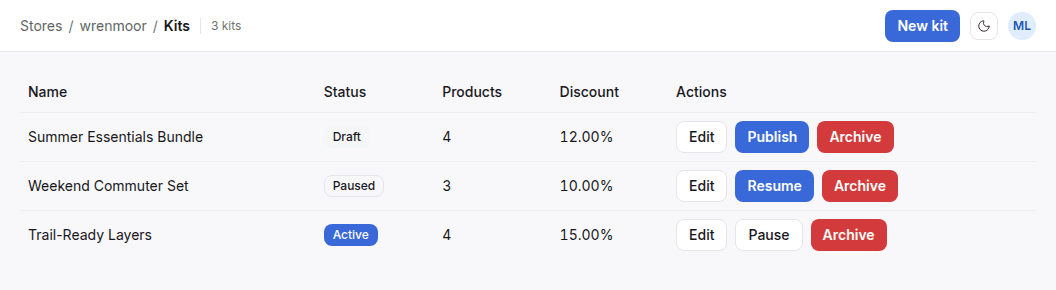
| Column | What it shows |
|---|---|
| Name | The kit's name. Press it to open the kit. |
| Status | Draft, Active, Paused or Archived. |
| Products | How many products are in the kit. |
| Discount | The discount, such as 15.00%, or Not set. A coupon kit adds · coupon, as in 15.00% · coupon. |
| Actions | What you can do with the kit now. |
What each status means
| Status | Shoppers see the kit | The discount applies | You can |
|---|---|---|---|
| Draft | No | No | Edit, Publish, Archive |
| Active | Yes | Yes | Edit the name and description, Pause, Archive |
| Paused | No | No | Edit, Resume, Archive |
| Archived | No | No | Edit to look at it. The kit is retired and gives no discount. |
A kit cannot be deleted or copied. To retire a kit, archive it.
Read next
- Create a kit: choose the products, the discount and the look.
- Kit discounts: how the discount reaches BigCommerce and who gets it.
- What shoppers see: the kit on your product page.
- Who sees a kit, and where: show a kit to some shoppers only, move it on the page, and change its colours.
- Kit results: views, adds to cart and orders.
- When a kit does not show: the checks to run, and the messages you may see.