Segment results
Read how big a segment is, how much its customers are worth, how it grows and shrinks, and what its customers buy.
The Analytics tab of a segment answers four questions. How many customers are in it? What are they worth? Is it growing? What do they buy?
Open Audience › Segments, open a segment, and press Analytics.
Before you start
StoreSpan works these numbers out once a day, overnight. A segment you activated today shows No analytics yet — the nightly rollup has not run for this segment. Come back tomorrow.
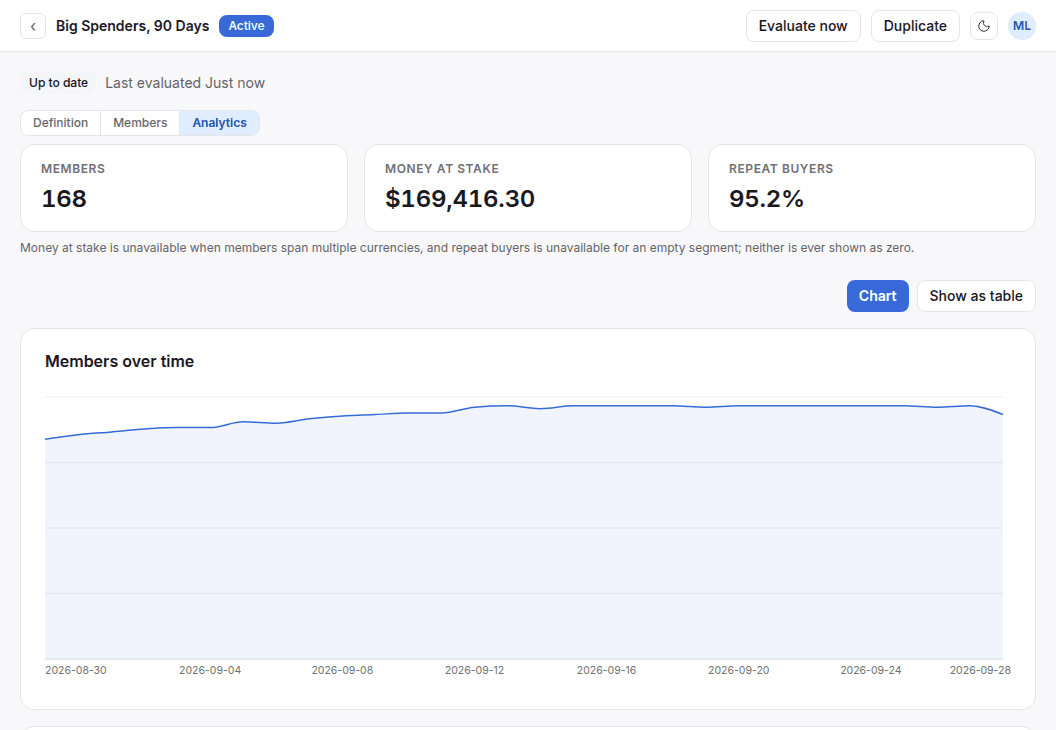
The three numbers at the top
| Number | What it tells you |
|---|---|
| Members | How many customers are in the segment. |
| Money at stake | What those customers have spent with you, in all their orders. Use it to judge what a segment is worth. |
| Repeat buyers | The share of members who have ordered more than once. |
A dash in place of a number means StoreSpan cannot give an honest figure:
| Number | Shows a dash when |
|---|---|
| Money at stake | The members have paid in more than one currency. |
| Repeat buyers | The segment has no members. |
StoreSpan never shows zero in these cases, because zero would read as a real result.
Is the segment growing?
| Chart | What it shows |
|---|---|
| Members over time | The number of members on each of the last 30 days. |
| Members joining and leaving each day | How many customers joined and how many left, day by day. |
A segment can stay the same size while many customers pass through it. The second chart shows that movement.
Switch from the charts to a table to see the exact figures for each day.
What do its customers buy?
Top products bought and Top categories bought rank what the members have ordered. The bars show money when the members paid in one currency, and the number of orders when they paid in several.
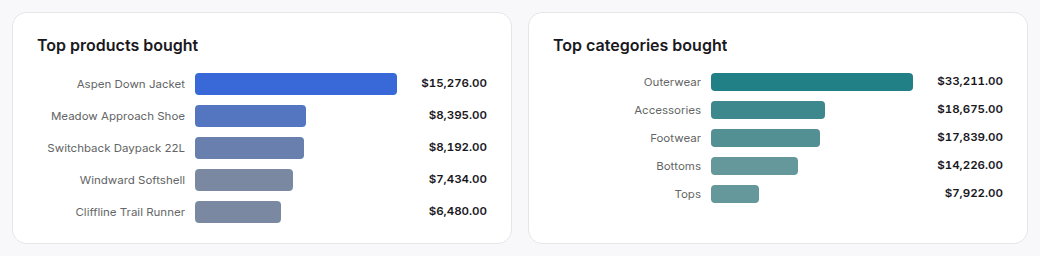
Use these to choose what to show the segment. For example, show Big Spenders, 90 Days a banner for the category they buy from most.
A segment whose members have not ordered for a long time, such as At Risk, has little or nothing here.
How fresh the numbers are
| What | Updated |
|---|---|
| The numbers on this tab | Once a day, overnight. |
| The list on the Members tab | Every hour. See Members. |
So the member count on this tab can differ a little from the list during the day.
StoreSpan keeps the daily figures for two years. See Data and privacy.