Audience overview
See all your customers at once, sorted into tiers by how recently, how often and how much they buy, and watch how they move between tiers.
The Audience overview shows every customer of your store at once, not one segment. It sorts them into tiers, from your best customers to the ones you have lost, and shows how they move.
Open Audience › Segments and press Audience overview.
Before you start
StoreSpan sorts your customers into tiers once a day, overnight. Until it has done so for the first time, the page says Customer tiers have not been scored yet. The list of segments at the bottom shows either way.
How customers are sorted
StoreSpan looks at three things about each customer, known together as RFM:
| Letter | Stands for | The question |
|---|---|---|
| R | Recency | How recently did they last order? |
| F | Frequency | How often do they order? |
| M | Monetary | How much do they spend? |
Each customer gets a score from 1 to 5 for each, compared with your other customers. The tier comes from the recency score, and from the frequency and spend scores taken together.
What the tiers mean
| Tier | Who is in it |
|---|---|
| Champions | Bought recently, buy often and spend the most. |
| Loyal | Buy often and spend well, and have bought fairly recently. |
| Potential Loyalist | Bought recently, and buy and spend a middling amount. |
| New / Recent | Bought very recently, and have bought little so far. |
| Promising | Bought fairly recently, and have bought very little so far. |
| Needs Attention | Middling on all three. |
| About to Sleep | Bought little, and are starting to go quiet. |
| At Risk | Bought a middling amount, and last bought a long time ago. |
| Can't Lose Them | Were among your best customers, and have not come back. |
| Hibernating | Last bought a long time ago, and spent little. |
| Lost | Lowest on all three. |
To act on a tier, create a segment with the RFM tier condition. Several templates do this for you, such as Champions and At Risk. See Create a segment.
Read the page
Above the grid and the tiers, a line says how many of your customers have placed an order — for example, 28 of 50,000 customers have placed an order — because the grid and tiers count only those customers.
| Part | What it shows |
|---|---|
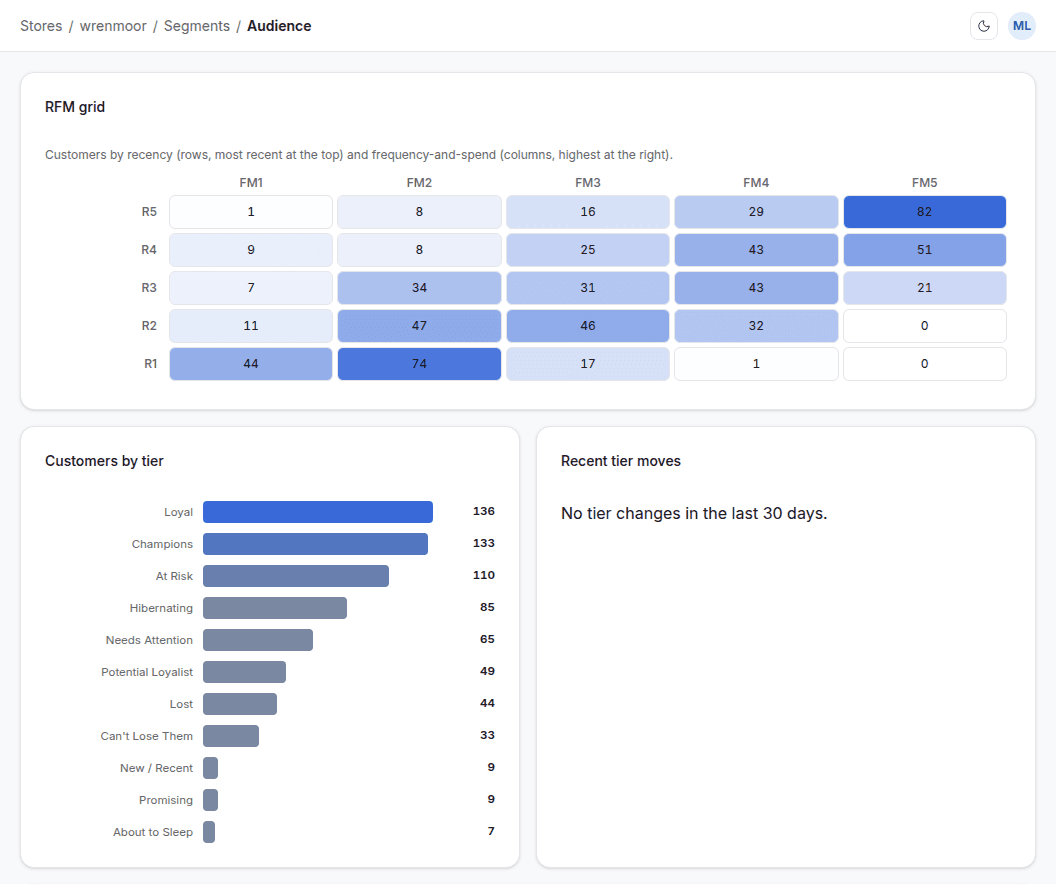
| RFM grid | Your customers in a grid of 25 squares. The rows R5 to R1 are the recency score, with the most recent customers at the top. The columns FM1 to FM5 are frequency and spend together, with the highest on the right. Point at a square to see its tier. It covers only the customers who have placed an order. |
| Customers with orders, by tier | How many customers who have placed an order are in each tier. |
| Recent tier moves | The largest moves from one tier to another in the last 30 days. |
| Segment sizes | Each of your segments with its number of members. Press one to open it. |
Recent tier moves is the part to watch. Many customers moving from Loyal to At Risk tells you something before your sales do. The card says No tier changes in the last 30 days. until StoreSpan has sorted your customers more than once.
A customer with too little history to score is counted as Not yet scored.