Put a segment to work
Activate a segment, keep a BigCommerce customer group in step with it, decide which segment wins when two overlap, and know how often members are updated.
A new segment is saved paused. It has no members and changes nothing. This page covers turning it on and connecting it to a BigCommerce customer group.
| Status | What it means |
|---|---|
| Active | StoreSpan keeps the members up to date. |
| Paused | StoreSpan stops updating the members. Content aimed at the segment keeps the members it had. |
Activate a segment
- Open Audience › Segments.
- Find the segment in the list and press Activate on its row.
The page confirms with The segment is now active and being evaluated. Members appear after the next update, within the hour. To see them sooner, open the segment and press Evaluate now.
To stop a segment, press Pause on its row.
Pausing takes customers out of the segment's customer group
When a paused segment has a customer group, StoreSpan treats its members as customers who left the segment. At the next update, their customer group changes, and with it the prices and discounts they see. See When a customer leaves every segment. To keep customers in the group, leave the segment active.
Keep a customer group in step
A segment can move customers into a BigCommerce customer group when they join, and out when they leave. Use this for anything BigCommerce does by customer group, such as price lists.
This changes your customers on BigCommerce
A customer has one customer group on BigCommerce. When StoreSpan moves a customer into a segment's group, the customer leaves the group they were in, and sees the prices and discounts of the new group. StoreSpan does not put the customer back into the earlier group later. Check what each group is used for before you connect it.
- Open the segment and find the Activation card.
- Under Mapped customer group, choose the group.
- Save.
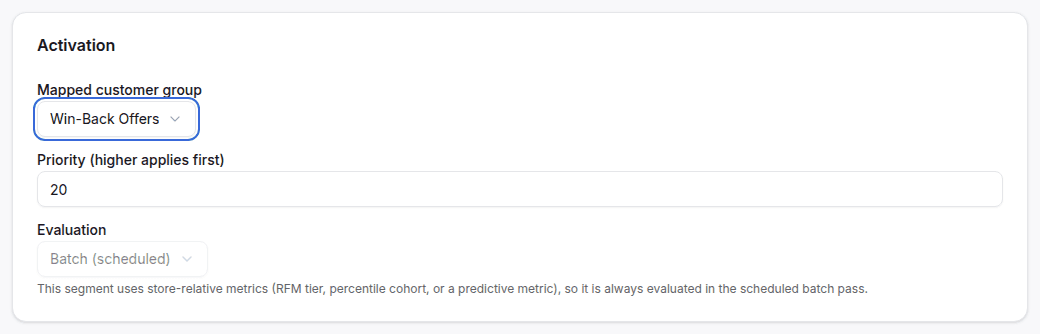
Leave it on Injection-only (no customer group) for a segment that only decides who sees your content. StoreSpan then changes no customer group.
If the list of groups is greyed out, StoreSpan is not allowed to change customer groups for your store. A notice above it tells you why and what to do. When it offers Resume write-back, press it to allow the changes again. See Writing to BigCommerce.
When a customer is in two segments
A customer can match two segments that each have a customer group, but can be in only one group. Priority decides: the segment with the higher number wins. When two segments have the same priority, the older one wins.
For example, At Risk has priority 20 and Big Spenders, 90 Days has priority 10. A customer who matches both goes into the group of At Risk.
StoreSpan tells you on the Activation card which segment wins. It warns you when two active segments share a priority and have different groups. Give one a higher priority to settle it.
When a customer leaves every segment
A customer who no longer matches any segment with a group has to go somewhere. You choose where, once for the whole store.
- Open Audience › Segments and press Activation settings.
- Choose one of the three.
- Press Save activation settings.
| Choice | What happens on BigCommerce |
|---|---|
| Take them out of every group | The customer ends up in no customer group. |
| Move them to a default group | The customer moves into the group you choose. |
| Leave their group as it is | Nothing changes. The customer keeps the group. |
If you later delete the default group on BigCommerce, StoreSpan takes customers out of every group instead. It does so until you choose a group that exists.
How often members are updated
| When | What StoreSpan does |
|---|---|
| Every hour | Adds and removes the customers whose orders changed. |
| Every night | Checks every customer again, to correct anything the hourly update missed. |
| When you ask | Checks every customer for one segment. See Update a segment now. |
In some segments, a customer can join or leave without placing an order. StoreSpan checks every customer of such a segment more often:
| The segment | StoreSpan checks every customer |
|---|---|
| Compares customers with each other, by RFM tier, Percentile cohort or Predictive metric. The tiers and scores themselves change overnight. | Every hour. |
| Has rules that move with the calendar, such as "in the last 90 days" | At least every six hours. |
StoreSpan never updates a paused segment.
Update a segment now
Press Evaluate now on the segment's page, or on its row in the list. StoreSpan checks every customer for this segment and updates the member count.
| The button is greyed out when | What to do |
|---|---|
| The segment is paused | Activate it first. |
| The segment uses a feature not yet available | Nothing. The segment cannot be updated yet. |
Wait a minute between two updates of the same segment.